Free template
Free Receipt Book Template (PDF, Word & Excel)
This receipt book format keeps the payment receipt and its matching numbered record stub together.
What goes on it
Receipt book fields
| Field | What to write | Example |
|---|---|---|
| Receipt number | the supplied sheet is numbered 0001, 0002, 0003. When you create another print batch, edit and check its range before printing; a manually managed number can be duplicated or skipped. | — |
| Date | written on the slip, every time. In a book the date plus the number is how you find a payment months later. | — |
| Received from | the payer's name. On a busy day it's tempting to skip; the day someone disputes a payment is the day this field was the point. | — |
| Amount, in figures and words | writing both can help reveal a transcription mismatch before the payer leaves. The slip has one short line for each. | — |
| For | three or four words: "July dues", "firewood, 1 cord", "stall fee". Enough that the stub still means something in March. | — |
| Received by | initials may be enough for an internal one-person workflow; a full name or signature is clearer when the payer may need to identify the recipient later. Write the business or collector name on each printed page. | — |
| The record stub | the narrow strip on the left of each slip repeats the number, date, amount and payer. | — |
Samples
Receipt book samples and examples
Receipt book sample format
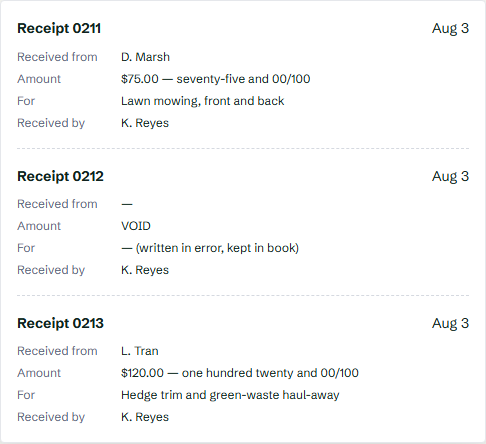
This filled receipt book example shows three slips from the same afternoon, including one that went wrong. It illustrates the workflow; the blank download itself begins at 0001. The slip to study is 0212. It was started for the wrong customer, so it was marked VOID and retained rather than presented as a payment. Keeping the voided number and a short reason makes the gap understandable when the sequence is reviewed later.
Customize your receipt book
PNG, JPG or SVG, up to 2 MB.
Free accounts can print one sample page. Full books and reprints require Pro.
Date
Payer
Amount
Received from
Amount $
For
Signature
Date
Payer
Amount
Received from
Amount $
For
Signature
Date
Payer
Amount
Received from
Amount $
For
Signature
Date
Payer
Amount
Received from
Amount $
For
Signature
This tool prints receipt books from your browser for your own records. It does not print or ship physical carbonless books.
Prefer a ready-made template?
A receipt book is for recording payments as they are received — at a job site, rental property, childcare handoff, club collection or market stall. Print three numbered receipts on one ordinary-paper sheet. Hand over each completed slip and keep its matching record stub.
One sheet, three slips, one retained stub per receipt.
The PDF keeps the supplied three-slip geometry fixed.
Use Word or Excel for labels, owner details and numbers.
Ordinary paper—not a carbonless or perforated NCR pad.
On this page
A receipt book you can print now
This receipt book format keeps the payment receipt and its matching numbered record stub together. This free printable template puts three blank receipt slips on each ordinary-paper sheet with a narrow record stub. Print it, cut or separate each completed receipt along the divider, and keep the numbered stub sheets together in a folder, binder or stapled stack. Use the PDF for a fixed print layout, Word for editing the labels, or Excel for editing cells before you print. The included files show receipt numbers 0001–0003; change and check the numbers yourself before printing another batch so no two live slips overlap. No sign-up, no watermark.
Download the receipt book template
Three blank receipt slips per ordinary-paper page with a numbered left-hand record stub.
receipt-book-template.pdf
receipt-book-template.docx
receipt-book-template.xlsx
Every download is free — no email, no sign-up, no watermark.
Invosmith provides downloadable files for ordinary-paper printing; it does not print or ship perforated or carbonless NCR receipt books.
The Word file also opens in Google Docs. The current files contain one three-slip sheet numbered 0001–0003; edit the numbers before printing later batches and check the new range against the last stub you kept.
How to fill out a receipt book
Complete the receipt while both parties can still check the payment.
- Check the next receipt number. Compare it with the previous stub before you write anything. If a number was spoiled, leave it visible and mark it VOID rather than silently reusing it.
- Write the payment date and payer. Use the date the money was actually received and the name of the person or organization that paid.
- Record the amount and payment method. Write the amount clearly. Add cash, card, check or a transfer reference when that detail will help you reconcile the payment later.
- Describe what the payment covered. Use a specific period, job, item or purpose — for example, “September rent”, “weekly childcare, Sep 7–11” or “lawn service at 14 Oak St”.
- Name or sign the receiver. Initials may work inside a one-person book; a signature or full name is clearer when the payer may need proof from the recipient.
- Separate the receipt and keep the stub or labeled copy. Cut along the divider after the entry is complete, give the receipt to the payer, and retain the numbered stub sheet. Enter the same number in your digital records if you reconcile the batch later.
What goes on each receipt in the book
Each slip is deliberately small — six fields, written in under a minute, because the person in front of you is waiting. The sequence and the retained stub sheets provide the paper trail, so keep each printed batch together and in order.
- Receipt number — the supplied sheet is numbered
0001,0002,0003. When you create another print batch, edit and check its range before printing; a manually managed number can be duplicated or skipped. - Date — written on the slip, every time. In a book the date plus the number is how you find a payment months later.
- Received from — the payer's name. On a busy day it's tempting to skip; the day someone disputes a payment is the day this field was the point.
- Amount, in figures and words — writing both can help reveal a transcription mismatch before the payer leaves. The slip has one short line for each.
- For — three or four words: "July dues", "firewood, 1 cord", "stall fee". Enough that the stub still means something in March.
- Received by — initials may be enough for an internal one-person workflow; a full name or signature is clearer when the payer may need to identify the recipient later. Write the business or collector name on each printed page.
- The record stub — the narrow strip on the left of each slip repeats the number, date, amount and payer.
Receipt book sample format
This filled receipt book example shows three slips from the same afternoon, including one that went wrong. It illustrates the workflow; the blank download itself begins at 0001.
| Receipt no. | Date | Received from | Amount | For | Received by |
|---|---|---|---|---|---|
| 0211 | Aug 3 | D. Marsh | $75.00 — seventy-five and 00/100 | Lawn mowing, front and back | K. Reyes |
| 0212 | Aug 3 | — | VOID | — (written in error, kept in book) | K. Reyes |
| 0213 | Aug 3 | L. Tran | $120.00 — one hundred twenty and 00/100 | Hedge trim and green-waste haul-away | K. Reyes |
The slip to study is 0212. It was started for the wrong customer, so it was marked VOID and retained rather than presented as a payment. Keeping the voided number and a short reason makes the gap understandable when the sequence is reviewed later.
Receipt book size and print setup
Receipt-book size can mean either the paper loaded into the printer or the finished slip you hand to the payer. This download uses one portrait sheet with three receipt-and-stub rows; it is not an A5 or A6 bound pad. The fixed PDF and Word file are set to US Letter (8.5 × 11 inches). If you print on another paper size, check the preview before committing a batch because automatic scaling can change the writing space and move the cut lines.
| File or product | Current layout | Print setup to check |
|---|---|---|
| PDF download | US Letter portrait; three numbered slips on one sheet | Use Actual size for the supplied geometry, or Fit only when the printer cannot cover the page margins; confirm all three dividers remain visible |
| Word download | US Letter portrait; editable labels, owner line and numbers | If changing to A4, inspect every divider and the final row in Print Preview before printing the batch |
| Excel download | One editable worksheet with receipts 0001–0003; paper size is controlled by your spreadsheet print settings | Set portrait orientation, select the used cells and fit to one page wide; preview the whole sheet before printing |
| A5 or A6 physical receipt book | A pre-cut or bound product rather than this three-up sheet | Choose a manufactured pad when the finished book size, perforation or portability matters more than home-printing |
Custom receipt book: what you can edit
Use the Word or Excel file when “custom” means changing the business name, field labels or starting receipt numbers before you print. A small logo can be added, but recheck the page preview because it may push the third slip onto another page. The PDF is the fixed-layout option and is not intended for editing.
Customization does not make ordinary printer paper carbonless, perforated or automatically numbered. If you need branded duplicate or triplicate NCR sets, a bound pad or a tear-off edge, use a commercial receipt-book printer and specify the finished size, copy count, logo and number range in the order.
Printable template, carbonless book or digital ledger?
| Option | Best for | Copy and numbering | Important limit |
|---|---|---|---|
| This printable template | A free book you can edit and print now | Three slips per sheet with a retained stub; you manage later number ranges | Ordinary paper does not create an automatic carbon copy |
| Duplicate or triplicate NCR book | Writing once and transferring the same entry to two or three physical sheets | Usually pre-numbered by the manufacturer; copies stay together in the pad | Branding and number ranges normally require buying stock or placing a print order |
| Digital receipt ledger | Searching, resending and reconciling receipts later | Copies are electronic and the software may control the sequence | Needs a working device and a system you will continue to use |
Receipt book or invoice book?
A receipt book records money already received: each numbered slip goes to the payer, and the matching stub stays with you. An invoice book, also sold as a bill book, records what a customer owes before payment, with the items, the amount due and the date it is due.
The download on this page is a receipt book. Its slips carry Received from, Amount in figures and in words, For and Received by, but no line items or due date. To issue numbered invoices instead, make an itemized invoice in the invoice maker and download it as a PDF. When the customer pays, write the receipt here and note the invoice number on the For line.
Who keeps the white, yellow or pink copy?
There is no safe color-only rule. Different manufacturers arrange their sheets differently, so follow the printed labels on the book. If you create your own copies, label the role directly instead of relying on paper color.
| Book style | Practical labeling | Typical handoff |
|---|---|---|
| Slip with retained stub | Receipt / Record stub | Payer receives the slip; issuer keeps the stub |
| Duplicate book | Customer copy / Business copy | One copy leaves; one stays with the issuer |
| Triplicate book | Customer / Business / Bookkeeper or collector | Assign the third copy to the person who actually reconciles it |
Receipt-book fields for recurring cash payments
A general receipt book supplies the common fields, but the purpose line must carry the detail that makes the payment recognizable. Use a specialized form when the scenario needs more than a short description.
| Situation | Add to the receipt | Use this owner when more detail is needed |
|---|---|---|
| Rent | Property address, rental period, amount paid and any remaining balance | Rent receipt template |
| Home daycare | Child or dependent, dates of care, provider identity and provider signature | Keep these details in the purpose and signature fields |
| Contractor or handyman paid at completion | Job address, work completed, payer, payee and payment method | Cash receipt template for a one-off completed receipt |
| Club, church or community collection | Collector, campaign or fund, payer and payment method | Donation receipt template when the document is specifically for a donation |
| Market stall | Short item description, payment method and seller initials | Sales receipt template when several goods need itemized lines |
Rent receipt fields in three official examples
NSW Fair Trading says a rent receipt must show the receiver, payer, rental-property address, payment date, amount and the period covered. Colorado law requires a contemporaneous receipt for an in-person tenant payment made with cash or money order, while Washington RCW 59.18.063 requires a written receipt when a landlord accepts cash.
Use the dedicated rent receipt template for the fuller property and period fields described by these sources.
When a customer loses their copy
Make a copy from your retained record and mark it clearly as a duplicate, for example “DUPLICATE of 0211, original issued Aug 3”. Keep it tied to the original number rather than making the same payment look like a second transaction. The stub gives you the details to reproduce the customer copy without relying on memory.
Keep each number sequence accountable
If several people take payments, assign each person a separate book or documented number range. For two businesses, keep separate sequences under the correct business name. This makes it easier to reconcile issued, voided and missing numbers without guessing who handled a payment.
Frequently asked questions
How does the numbering continue when I print more pages?
What do I do with a slip I've ruined?
Can I use the book for card or transfer payments too?
I lost the whole receipt book. What now?
Do I need the paper book if I also track payments digitally?
Can one receipt book cover two of my businesses?
Related receipt templates
One payment by cash, card, check or transfer, with filled samples.
→The one-off version, two copies to a page.
→For rent — period, property and balance fields.
→Itemized receipts for goods sold and paid on the spot.
→