Free Delivery Receipt Template (PDF, Word & Excel)
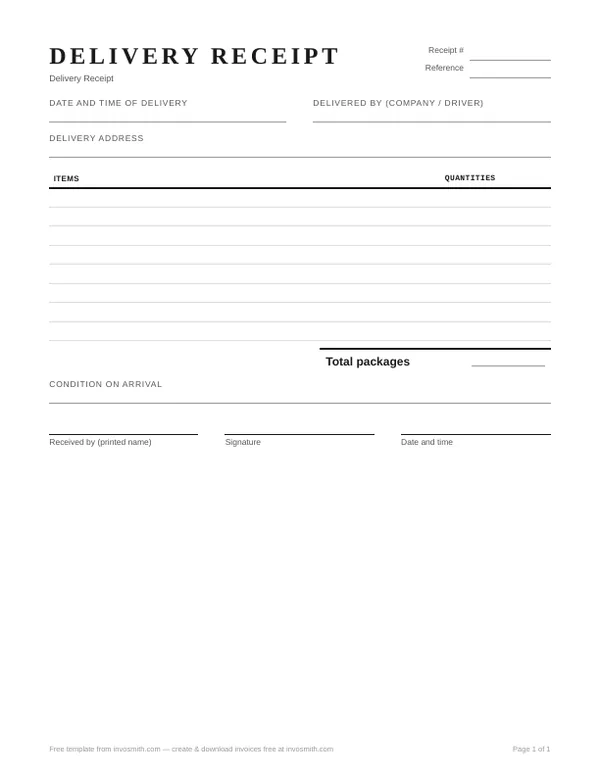
A delivery receipt records a handover: what arrived, when and where it arrived, the quantity or package count, the condition that was visible at the time, and who received it.
It is not an invoice and this generic template has no price fields. Download the PDF to print, the Word file to edit, or the Excel file to reuse. No sign-up or watermark.
Word and Excel versions are listed with each document below.
- No sign-up
- No watermark
- Free
On this page
Download the delivery receipt template
Delivery receipt template
A handover record with quantities, visible condition and a receiver signature block.
Every download is free — no email, no sign-up, no watermark.
The Word and Excel files are editable; check the full printout after editing. This is a generic form, not a carrier-issued POD or a jurisdiction-certified tax document.
What to record on a delivery receipt
Complete the receipt while the delivery can still be checked. Record what is observable, and distinguish the condition of the outer package from contents that were not opened.
- Receipt number and reference. Add your own sequence plus the order, shipment or invoice reference that connects this form to the rest of the record.
- Delivery date and time. Record when the handover occurred.
- Delivered by. Name the company and, when useful, the driver or person completing the handover.
- Delivery address. Use the place where the goods were actually left, which may differ from the billing address.
- Items and quantities. Describe what arrived and count the units or packages before signing.
- Visible condition. Write what can be seen at handover. For sealed cartons, say that the outer packaging was inspected and the contents were not.
- Receiver name and signature. Capture a readable printed name alongside the signature.
- Exception or refusal note. Identify the affected item or package, quantity accepted or refused, visible condition and time.
Filled delivery receipt example
This fictional DR-0209 example records a two-carton handover. Its condition entry says what was actually checked: the outer cartons were intact, while the contents were not inspected at the door. It does not claim that the products inside were undamaged.
| Field | Entry |
|---|---|
| Receipt no. | DR-0209 |
| Reference | Order ORD-3348 |
| Date and time of delivery | August 5, 2026 — 11:40 am |
| Delivered by | C. Haddad, Merlon Couriers |
| Delivery address | Unit 4, 92 Calder Park Dr |
| Items | Pendant light fixture, boxed — 3; mounting kit — 3 |
| Number of packages | 2 cartons (fixtures in 1, kits in 1) |
| Condition on arrival | Outer cartons intact — contents subject to inspection |
| Received by | M. Alvarez (printed) — signature |
If something is damaged or refused
Before signing, write the affected item or package, visible condition, quantity accepted or refused, time, and the receiver or refuser name. Photograph the condition when useful, keep a copy of the receipt, notify the relevant supplier or carrier promptly, and check the contract or carrier terms for the required process and deadline.
A contemporaneous note makes the handover record more specific, but this template does not determine whether a later claim succeeds.
- Copyable condition note: “DR-0210: 1 carton / 3 mounting kits accepted. 1 carton / 3 fixtures refused because the outer corner is crushed. Both cartons remained sealed; contents not inspected. Photo DR0210-01. Recorded with M. Alvarez and C. Haddad at 10:20 am.”
- The accepted and refused quantities reconcile to all 2 cartons / 6 units presented. Do not enter 6 as the package count. If the note is too long for the form, attach a dated exception sheet carrying the same receipt and order references.
| Exception record | Fictional entry — separate delivery DR-0210 |
|---|---|
| Reference / time | Order ORD-3350; August 6, 2026, 10:15 am |
| Presented | 2 cartons / 6 units: 3 boxed fixtures in carton 1, 3 mounting kits in carton 2 |
| Accepted | Carton 2: 3 mounting kits; outer carton intact, contents not inspected |
| Refused | Carton 1: 3 fixtures; outer carton corner crushed, sealed contents not inspected |
| People / record | Receiver M. Alvarez; driver C. Haddad; acknowledgement recorded at 10:20 am; photo reference DR0210-01 |
Complete the handover and give each party a copy
The sender can prepare the receipt number, order reference, delivery address and expected items. At handover, the receiver and delivery person check actual quantities and visible condition, record exceptions, then complete the name, date, time and signature fields appropriate to the handover. In Excel, enter the package count separately: the sum of item units is not necessarily the number of cartons.
Give the receiver a copy and return a copy to the sender with any exception sheet or photo references. Keep the receipt tied to the order and shipment record. If it is refused or partly accepted, follow the agreed supplier or carrier process; do not erase the original exception when recording a later redelivery.
What the receiver signature records
A signature records the receiver and the information written on the receipt at handover. It does not by itself check hidden contents, settle every later damage claim or replace the terms agreed with the carrier, supplier or customer.
Delivery receipt, delivery note, POD and invoice
A delivery note usually travels with the shipment and lists what was sent. A delivery receipt focuses on recording the handover and receiver acknowledgement. One document may perform both jobs, and terminology varies by business and country.
“Proof of delivery” can describe a wider carrier record such as a scan, photo or electronic acknowledgement. An invoice is the seller's payment document; this generic receipt does not replace it and deliberately contains no price fields.
Philippines: check the BIR document boundary
For Philippine tax use, check the current BIR rules and your registered documents. In the reviewed BIR Revenue Regulations No. 7-2024, a delivery receipt is listed as a supplementary document, and supplementary documents are not valid proof for a buyer's VAT input-tax claim. This generic download is not a BIR-registered principal invoice.
Where this document fits in the business paperwork
A typical goods-on-account workflow is: quote or pro forma → purchase order → work order if needed → dispatch documents → delivery receipt → invoice → payment receipt → statement. Actual timing varies: an export commercial invoice travels with the shipment, and a statement may be sent before the customer pays. Not every transaction needs every document.
- For dispatch, choose the actual document task: packing slip for the package contents; delivery note for the goods sent; bill of lading for the relevant transport record; delivery order for a release instruction. These are not interchangeable forms.
- Carry the relevant order, shipment and invoice references between documents. Each download remains a separate document record.
| Document | Who sends it, and when | Prices or amounts |
|---|---|---|
| Quote / pro forma | Seller → buyer before the order or agreed advance-payment stage | Proposed prices; not the final invoice for this sequence |
| Purchase order | Buyer → seller to place the order | Agreed items, quantities and prices |
| Work order | Customer or authorized coordinator → service provider to specify work | Scope and agreed charges where applicable |
| Dispatch documents | Sender → recipient or carrier at dispatch; see the document choices below | Depends on the document; not a substitute for the invoice |
| Delivery receipt — this page | Receiver acknowledges the handover to the sender or carrier | Our template records quantities and condition, without prices |
| Invoice / commercial invoice | Seller → buyer for the sale; commercial invoice also supports the export shipment | Item values and applicable charges |
| Payment receipt | Payee → payer after receiving payment | Amount received and payment reference |
| Statement of account | Supplier → customer at an agreed cutoff to reconcile the account | Recorded invoices, payments, credits and remaining balance |