Free Statement of Account Template (PDF, Word & Excel)
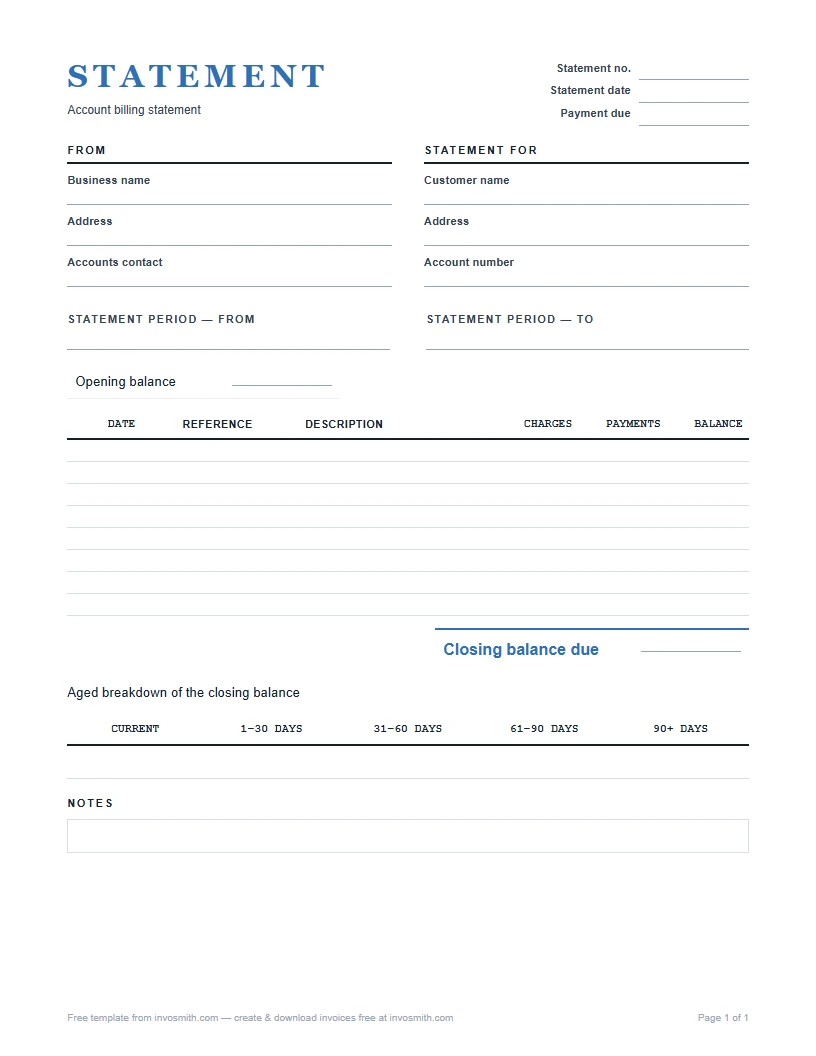
A statement of account — also called a billing statement — is a period summary of the invoices, payments, credits and resulting balance recorded for one customer.
Download the static PDF, Word or Excel file; no sign-up or email gate. It is a file you fill, not an online ledger or automated ageing system.
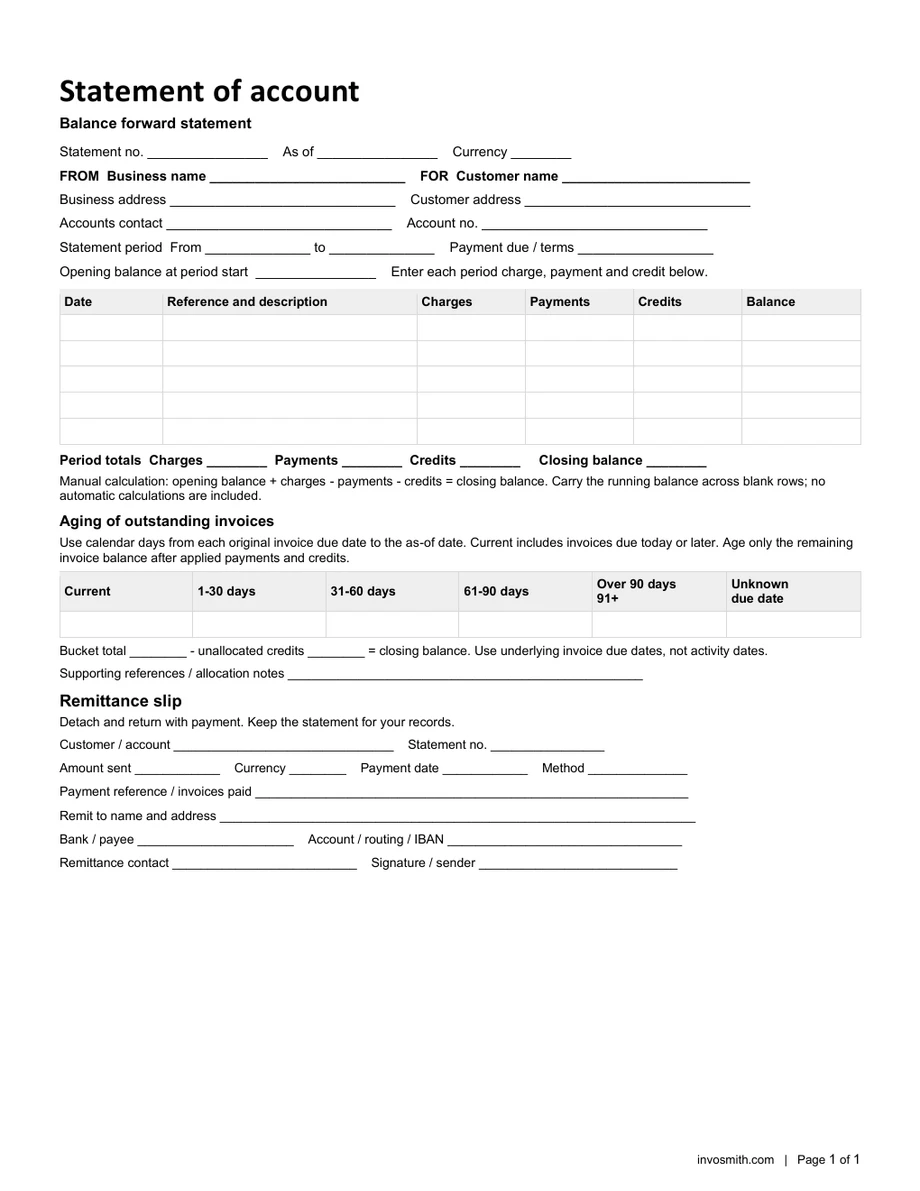
Choose the open-item version to list invoices still unpaid, or the balance-forward version to explain how the account changed during a period. Both include a remittance section. For the underlying concept, read what a billing statement is.
Word and Excel versions are listed with each document below.
- No sign-up
- No watermark
- Free
On this page
Download a statement of account template
Open-item statement (PDF / Word / Excel)
Unpaid invoices, due dates, applied payments or credits, remaining balances, manual ageing and remittance details.
Balance-forward statement (PDF / Word / Excel)
Opening balance, dated charges and payments, running and closing balances, manual ageing and remittance details.
Every file is free to download. The PDF is fixed for printing; Word and Excel are editable.
These are static files. They do not connect to a ledger, import transactions, calculate ageing automatically or schedule statement runs.
What to include in a statement of account
For reminders after the agreed date, see past due invoice.
- Account and period. Name the customer and the start and end dates covered by the statement.
- Invoice references and amounts. An open-item statement lists each unpaid invoice, its due date, original amount and applied payments or credits. Do not add a brought-forward total on top of those same invoices.
- Opening balance and activity. A balance-forward statement starts with the previous closing balance and records the period’s charges, payments and supported adjustments in date order. Keep each source reference beside its amount.
- Closing balance. Reconcile the unpaid-invoice total or the opening-plus-activity total to the customer account. Identify unallocated credits separately rather than pretending they paid a particular invoice.
- Manual ageing. Use Current, 1–30, 31–60, 61–90 and over-90 days overdue, plus Unknown for a missing due date. These are manual fields, not automatic ageing calculations.
- Remittance advice. Ask the customer to return their account/reference, payment amount and allocation details with payment. This helps match the receipt; a completed advice is not proof that money arrived.
Statement of account example
This fictional balance-forward example uses USD and a July 31, 2026 cutoff. Redwood Cafe starts July with $450 outstanding. The July 24 payment clears that opening item; the July 11 payment is allocated to invoice 214.
Statement of Account — July 1 to July 31, 2026 · Customer: Redwood Cafe
Closing balance: $450 + $860 − $400 + $310 − $450 + $180 = $950. The next table reconstructs the same amount from the invoices that remain unpaid. There are no unallocated credits in this example.
| Date | Activity | Charges | Credits | Balance |
|---|---|---|---|---|
| Jul 1 | Opening balance | 450.00 | ||
| Jul 3 | Invoice #214 | 860.00 | 1,310.00 | |
| Jul 11 | Payment #1088 applied to invoice 214 | 400.00 | 910.00 | |
| Jul 18 | Invoice #221 | 310.00 | 1,220.00 | |
| Jul 24 | ACH clears the opening item | 450.00 | 770.00 | |
| Jul 29 | Invoice #229 | 180.00 | 950.00 | |
| Closing balance | 950.00 |
Read the example’s ageing as of July 31
Age the remaining invoice balance from its due date, not from the invoice date. Invoice 214 was due July 10: July 31 is 21 days later, so its $460 unpaid remainder belongs in 1–30 days overdue. Invoices 221 and 229 are not due yet.
- Current: not overdue, including an invoice due on the statement date. Current does not mean “issued within the last 30 days.”
- Overdue: 1–30, 31–60, 61–90 and over 90 days (91 onward). Each unpaid amount belongs in one bucket only. The final three buckets are zero in this example.
- Unknown due date: do not guess or hide the amount in Current. Show it separately and confirm the terms before assigning an overdue bucket.
- Unallocated credit: if a credit has not been applied to an invoice, keep it separate. For example, 500 of unpaid invoices minus 100 unallocated credit reconciles to a net account balance of 400. Do not subtract the credit again after allocating it to an invoice.
| Invoice | Due date | Original − applied (USD) | Unpaid | Ageing bucket |
|---|---|---|---|---|
| 214 | July 10, 2026 | 860 − 400 | 460.00 | 1–30 days overdue |
| 221 | August 17, 2026 | 310 − 0 | 310.00 | Current |
| 229 | August 28, 2026 | 180 − 0 | 180.00 | Current |
| Total | As of July 31, 2026 | No unallocated credits | 950.00 | Current 490 + 1–30 overdue 460 |
Two more statement scenarios
These fictional examples illustrate different account-summary jobs. They are not real customer records, tax determinations or recommended payment terms.
Freelancer · show what remains after a partial payment
As of August 31, 2026, a designer has invoice AUG-104 for USD 900, due August 15. A USD 300 payment on August 20 is applied to it, leaving USD 600, now 16 days overdue. Invoice AUG-112 for USD 450 is due September 14 and is Current. The open-item statement totals USD 1,050: Current 450 + 1–30 days overdue 600. Other buckets and unallocated credits are zero.
List the two source invoice references and the partial-payment allocation. The statement explains the remaining balance; it does not rebill the USD 300 already received.
Philippines · a generic customer SOA, not a Billing Invoice
A fictional customer summary in PHP starts with 2,000, adds 8,000 from already issued invoices and records a payment of 5,000: closing balance PHP 5,000. Keep the actual invoice and payment references beside the activity. This abbreviated illustration does not specify invoice due dates or payment allocations, so it does not assign overdue buckets. Reconcile the source items before adding ageing.
This is a generic reconciliation example, not a BIR-registered form. It does not replace an Invoice or Billing Invoice required for the underlying transaction. See the Philippines note below for the supplementary-document distinction.
Choose open-item or balance-forward, then choose the file format
Use open-item when the customer needs a short list of invoices still unpaid. Use balance-forward when they need to trace what happened between the previous and current statements. The name “statement of account” can describe either approach; the included fields matter more than the label.
- Open-item Excel: enter a numeric original amount and applied payment/credit amount for each started invoice row. Use 0 when nothing has been applied. “Complete amounts” means the total cannot yet be trusted. Leave genuinely unused rows empty.
- Balance-forward Excel: enter invoice charges positively, credit notes as negative Charges, payment receipts as positive Payments and payment reversals as negative Payments. Do not record one credit in both columns.
- Ageing in both versions: allocate remaining invoice amounts manually. Include Unknown where needed and enter any unallocated credit already reflected in the account. This reconciliation does not post another credit.
- More rows: the supplied formula and print ranges are finite. If you extend the sheet, extend the affected formulas and print area and test the final added row before using the new total. These files do not import invoices, match bank payments, send reminders or synchronize a customer ledger.
| Format | Useful for | Before sending |
|---|---|---|
| Print and complete a fixed blank form | Write the totals and allocations clearly; it is not an interactive PDF form. | |
| Word | Edit customer details, line descriptions and layout | Recalculate amounts yourself, then export a dated PDF copy. |
| Excel | Enter items or activity and use the supplied amount formulas | Check input cells, formula ranges, credits and manual ageing; inspect the complete printout. |
Statement of account vs invoice
An invoice asks for payment for a specific sale or service. A statement summarizes multiple account entries over a period. Keep invoice numbers on the statement so the customer can trace each charge back to its source document.
If a new charge needs to be billed, create the appropriate invoice first and let the statement report that invoice. Use a credit memo template or debit note when one of those documents is the correct source for an adjustment.
Before you send the statement: four checks
- Match the account and period. The customer name, statement period and opening balance must match the account and the prior statement.
- Trace every activity line. Each charge should point to an invoice already issued; each credit should point to the payment or adjustment that created it. If new work needs billing, raise an invoice first and let the statement report it.
- Redo the balance. Opening balance plus charges, minus payments and credits, must equal the closing balance. Remaining invoice ageing, including Unknown, minus separately identified unallocated credits must reconcile to that same net balance.
- Make the next step obvious. Keep the closing balance prominent and give the customer the relevant invoice references so they can reconcile or query a line quickly.
Send a dated copy and keep the payment references together
Choose the cutoff and cadence to suit the customer agreement and account volume: for example, a monthly statement for a repeat buyer or an agreed reconciliation after several transactions. Do not treat a statement date as a new invoice due date.
Reconcile source invoices, receipts and credits through that cutoff. Save a dated PDF, retain the editable file, and send it to the customer’s agreed accounts contact. Include the period, account reference and a way to query a particular line. Keep any returned remittance advice with the payment allocation, then confirm the money actually arrived.
Example email: “Hi Alex, attached is Redwood Cafe’s statement for July 1–31, 2026. The closing balance is USD 950; invoice 214 has USD 460 overdue and the other listed invoices are not yet due. Please quote your account and invoice references with payment. If a payment or credit is missing, reply with its date, reference and amount so we can reconcile it.”
Before following up, check whether payment, a credit or a dispute arrived after the cutoff. If the source records change, issue a clearly dated replacement rather than silently overwriting the copy the customer already received.
How to correct a disputed line
- Name the exact line. Record its date, invoice or payment reference and amount. First establish whether the question is about a charge, a credit or the period it appears in.
- Open the source record. Compare the activity line with the invoice already issued, or with the payment or adjustment that created the credit. Keep the reference visible in the reply.
- Rebuild the total. Recalculate opening balance, charges, payments and credits through to the closing balance. Recheck invoice allocations and ageing separately. If a source record is wrong, correct that record first and issue a dated replacement statement that reports the corrected activity.
Country notes: use the right document for the job
The account-summary task is similar across countries, but tax-document rules are not interchangeable. These downloads are generic customer statements, not certified tax invoices. Named provisions below were reviewed on September 26, 2026 from official sources retrieved September 25; check subsequent changes and your circumstances before relying on them.
| Country | Main distinction | Basis |
|---|---|---|
| Philippines | Supplementary SOA is not the required principal Invoice / Billing Invoice | RR 7-2024 and RMC 77-2024 |
| Australia | A monthly statement may qualify only where tax-invoice requirements are met | ATO GSTR 2013/1, paragraphs 9 and 35 |
| United States | Practical account reconciliation, not a nationwide legal standard | Workflow guidance; no legal-effect claim |
| United Kingdom | Interest eligibility and charges need separate contract/statutory review | GOV.UK late-payment guidance |
Philippines · supplementary SOA versus Billing Invoice
BIR RR 7-2024, section 2 lists billing statements and statements of account as supplementary documents. They do not support a buyer’s VAT input-tax claim as principal invoices. Keep the references to the actual issued invoices.
RMC 77-2024, questions 14 and 27 distinguishes the Billing Invoice required upon billing for the recurring-service situation it addresses, and supplementary documents issued without the corresponding invoice on a sale. Renaming this template “Billing Invoice” does not supply the required registration or invoice information. Question 10’s conditional conversion of unused old documents requires the prescribed invoice information, including quantity, unit cost and the description of goods or nature of services; it does not certify these newly downloaded files.
Australia · a statement can meet tax-invoice rules only if its information does
ATO GSTR 2013/1, paragraphs 9 and 35 explains that a monthly statement covering several supplies can qualify as a tax invoice for supplies whose requirements it meets. The price of each supply must be determinable; an account balance alone is not enough. Do not assume this generic account-summary file meets those requirements. Retain the appropriate source tax invoices and check the ruling before combining document roles.
United States · practical account reconciliation
For a US customer account, label the currency, account, period, invoice references, payments and credits clearly. Agree the statement cadence with the customer and keep the source records behind it. This is practical bookkeeping guidance, not a nationwide tax-invoice standard or a claim that silence legally accepts a debt. Check any state, industry and contractual requirements separately.
United Kingdom · late-payment interest is a separate decision
A statement can show overdue invoices; its label does not create a late-fee entitlement. GOV.UK’s commercial late-payment guidance describes statutory B2B interest as 8% plus the Bank of England base rate, distinguishes contractual interest and public-authority contracts, and says to send a new invoice when adding interest.
The Late Payment of Commercial Debts (Interest) Act 1998 applies to qualifying commercial debts, with contractual-remedy conditions in sections 8–9. Check applicability and the relevant rate before adding a charge. This workbook neither determines eligibility nor calculates interest.
Construction and progress billing: summarize, do not certify
For a construction account, keep project, invoice and payment references visible. The statement summarizes amounts already recorded; it is not a progress claim, payment certificate or calculation of retention. Use the underlying construction invoice or contractor invoice records for the work and charges, then reconcile their unpaid amounts here.
Where this document fits in the business paperwork
A typical goods-on-account workflow is: quote or pro forma → purchase order → work order if needed → dispatch documents → delivery receipt → invoice → payment receipt → statement. Actual timing varies: an export commercial invoice travels with the shipment, and a statement may be sent before the customer pays. Not every transaction needs every document.
- For dispatch, choose the actual document task: packing slip for the package contents; delivery note for the goods sent; bill of lading for the relevant transport record; delivery order for a release instruction. These are not interchangeable forms.
- Carry the relevant order, shipment and invoice references between documents. Each download remains a separate document record.
| Document | Who sends it, and when | Prices or amounts |
|---|---|---|
| Quote / pro forma | Seller → buyer before the order or agreed advance-payment stage | Proposed prices; not the final invoice for this sequence |
| Purchase order | Buyer → seller to place the order | Agreed items, quantities and prices |
| Work order | Customer or authorized coordinator → service provider to specify work | Scope and agreed charges where applicable |
| Dispatch documents | Sender → recipient or carrier at dispatch; see the document choices below | Depends on the document; not a substitute for the invoice |
| Delivery receipt | Receiver acknowledges the handover to the sender or carrier | Our template records quantities and condition, without prices |
| Invoice / commercial invoice | Seller → buyer for the sale; commercial invoice also supports the export shipment | Item values and applicable charges |
| Payment receipt | Payee → payer after receiving payment | Amount received and payment reference |
| Statement of account — this page | Supplier → customer at an agreed cutoff to reconcile the account | Recorded invoices, payments, credits and remaining balance |