Free template
Free Work Order Template (PDF, Word & Excel)
Use this work order template to record requested work, the location, the person assigning it, the approval record and completion notes. The sample in this work order template connects the maintenance task with its authorization and completion record. PDF, Word and Excel files are offered. It is a document workflow, not a dispatch system or a substitute for trade-specific safety procedures. Start with scope and approval before optional labor or parts amounts. Keep a job estimate reference if one exists, then reference the work order on the eventual invoice.
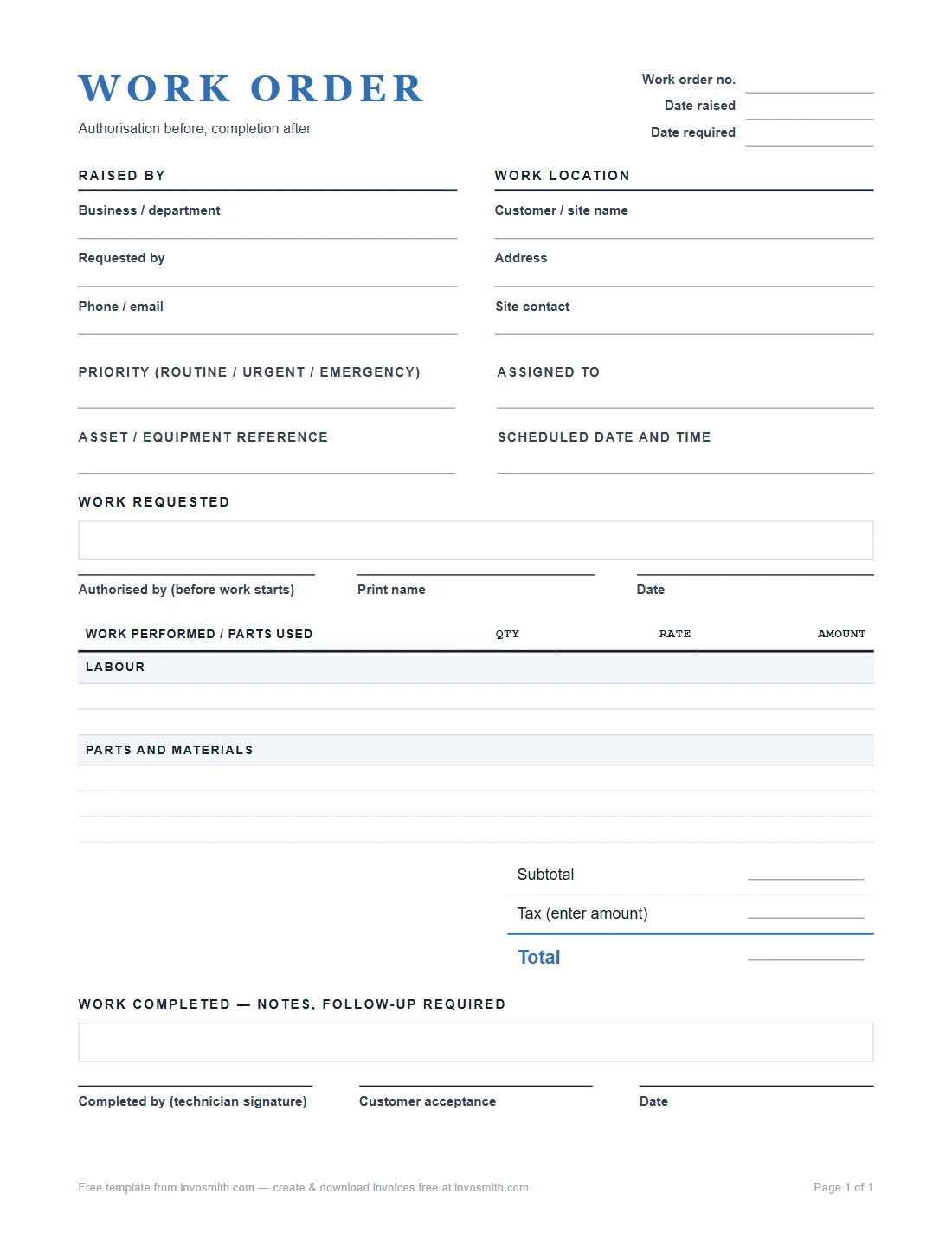
Download the work order template — Word, Excel or PDF
Work Order Template (PDF / Word / Excel)
PDF, Word and Excel layouts for recording a job reference, requester, location, scope, assigned person, approval and completion. Check the actual file and your own approval and safety procedures before use; this page does not promise dispatch, legal authorization or automatic calculations.
Choose the format that fits your job record. Fill in the scope, assignment and approval record under your process, then review the completed file for legibility before sharing it.
What goes on a work order, field by field
Use these recommended entries so another person can act on the request. Follow your organization's approval and safety requirements; this checklist does not itself grant permission to do the work.
Write the requested outcome and the location before assigning the job. A technician should be able to distinguish the original scope from later findings, while the requester should be able to see which task was completed. Keep access notes, asset identifiers and contact details beside the scope when they affect where or how the work is performed.
- Work order number and date. The job's identity. Every later document — the invoice, a change note, a callback — refers to this number, so it goes at the top, large, with the date the order was raised.
- Requested by / contact. Who asked for the work, with a phone number or email. When the crew on site has a question, this is who they call — not whoever happens to answer at the office.
- Location or unit. Where the work happens. For property work this is the unit or address; for equipment it is the machine or asset. Specific enough that a stranger could find it.
- Description of work, line by line. What exactly is to be done, one task per line. "Fix bathroom" invites arguments; "replace fill valve in upstairs bathroom toilet" doesn't. The lines here define what "done" means.
- Priority and needed-by date. How urgent, and by when. A work order without a date quietly becomes a suggestion.
- Approval record. Name the person and approval method required by your process. A blank or completed signature line alone does not establish authority.
- Assigned to. Who is actually doing the work — a name, not a company.
- Labor and parts. Optional hand-entered amounts if you track cost on the order itself. Leave them blank if pricing lives elsewhere. If you record time here, sum the hours recorded on the work order before carrying them into an hourly invoice. Use the add time calculator to combine separate hours-and-minutes entries into a total.
- Completion notes. What was actually done, in the technician's words, including anything found that wasn't on the original lines.
- Completed date and sign-off. Record who acknowledged the handover, what was checked and any remaining work. A signature does not settle every dispute.
Work order sample: maintenance and authorization
Illustrative only: WO-2041 concerns a water-heater replacement in Unit 12. M. Alvarez requests and approves the listed scope on July 22; D. Okafor is assigned. The example records completion on July 23 after installation and testing. It is not a real job or licensed-work instruction.
Work Order #WO-2041 · July 22 · Priority: High · Needed by: July 24 Requested by: M. Alvarez, property manager · (555) 014-2276 Location: Unit 12, 448 Corley Ave Authorized by: M. Alvarez — signed July 22 · Assigned to: D. Okafor
| Description of work | Amount |
|---|---|
| Remove failed 40-gallon water heater, Unit 12 | — |
| Install new 40-gallon water heater, connect and test | — |
| Labor (4 hrs) | $240.00 |
| Parts: 40-gal water heater, fittings, pan, replacement shut-off valve | $685.00 |
| Total | $925.00 |
Change approval: CR-2041-1 — seized shut-off valve replacement approved by M. Alvarez on July 23 before the extra work; replacement valve included in the parts total. Completion notes: Old unit removed; new unit installed and tested at temperature. Seized shut-off valve replaced under CR-2041-1. Completed: July 23 · Sign-off: M. Alvarez — signed July 23
The fictional example records $240 labor plus $685 parts, including the replacement valve, totaling $925. The change record makes clear that the valve was outside the original scope, who approved it and how its cost was treated. In a real job, retain the approval method and timing required by your process before describing extra work as authorized. Completion notes should distinguish work actually done from work remaining; sign-off is a record, not a guarantee against dispute.
WO-2041 remains the anchor across the request, assignment and completion note. It lets the requester, assigned technician and billing record point to the same job without copying the entire scope into every document. The handover can then name what was completed, what remained and which related change record applies.
Use the same pattern when timing changes: keep the requested date, record the revised timing beside the change, and state what remained unfinished at handover. This preserves the sequence without making the completion signature carry information that belongs in the scope or change record.
Work order, estimate, or invoice?
Keep proposal, work record and billing record separate: an estimate can describe proposed work, this file can record instructions and completion, and an invoice records billing. These labels alone do not decide contractual rights.
Carry references across the records when useful: an estimate number on the work order and the work order number on the invoice help explain the handoff. For a change, record the original work order, changed task, reason, cost or timing effect if known, and who approved it under your process. Keep the earlier version.
This chain also prevents the final invoice from becoming the first place a changed task appears. The estimate describes the proposal, the work order and dated change record describe what was assigned, and the completion note records what was done. The invoice can then point back to those records instead of repeating the full job history.
Frequently asked questions
Who issues a work order?
Assign preparation within your workflow: a requester, manager or service team can prepare the record, while actual approval must come through your process.
Is a signed work order a contract?
This page does not determine legal enforceability. Review the actual document and agreements with an appropriate adviser if you need that conclusion.
What is the difference between a work order and a purchase order?
Use this file when the main task is recording a job's scope, assignment and completion. Use the purchase order template for the buyer-to-vendor ordering record; a PO is not limited to goods.
Can the work change after the order is signed?
Record the change in a dated revision or note referencing the original work order, and obtain approval under your process. Keep the earlier version so the history remains clear.
How should I number work orders?
Use one consistent reference system, such as WO-1001, and carry the reference into related records. This is a suggested convention, not a prescribed numbering rule. See the invoice template for Excel for the billing side.
What tools can I use to keep a digital work order book?
Keep the editable work order files with a simple register in Excel or another spreadsheet. Give each order a reference, and record the customer or site, requested work, assigned person, needed-by date, current status and the filename or link to the order. Update the register when the scope changes or the work is completed. This is a manual record you maintain. The downloadable work order template provides the job document; it does not dispatch technicians or update a live job queue. Carry the work order reference onto the estimate, change record and invoice so the register can lead you to the whole job history.
Can I use a digital work order for auto repair?
Use the work order to connect the vehicle, requested work, assigned technician, approval record and completion notes. Keep the vehicle identifier and the customer's reported problem visible, and distinguish the originally approved work from later findings. The auto repair estimate template adds the parts-and-labor estimate and repair-choice records before the final invoice. Keep those documents together. A digital file makes the record easier to edit and share, but a blank approval field is still blank; it does not establish that the customer authorized a repair.