Quote Template
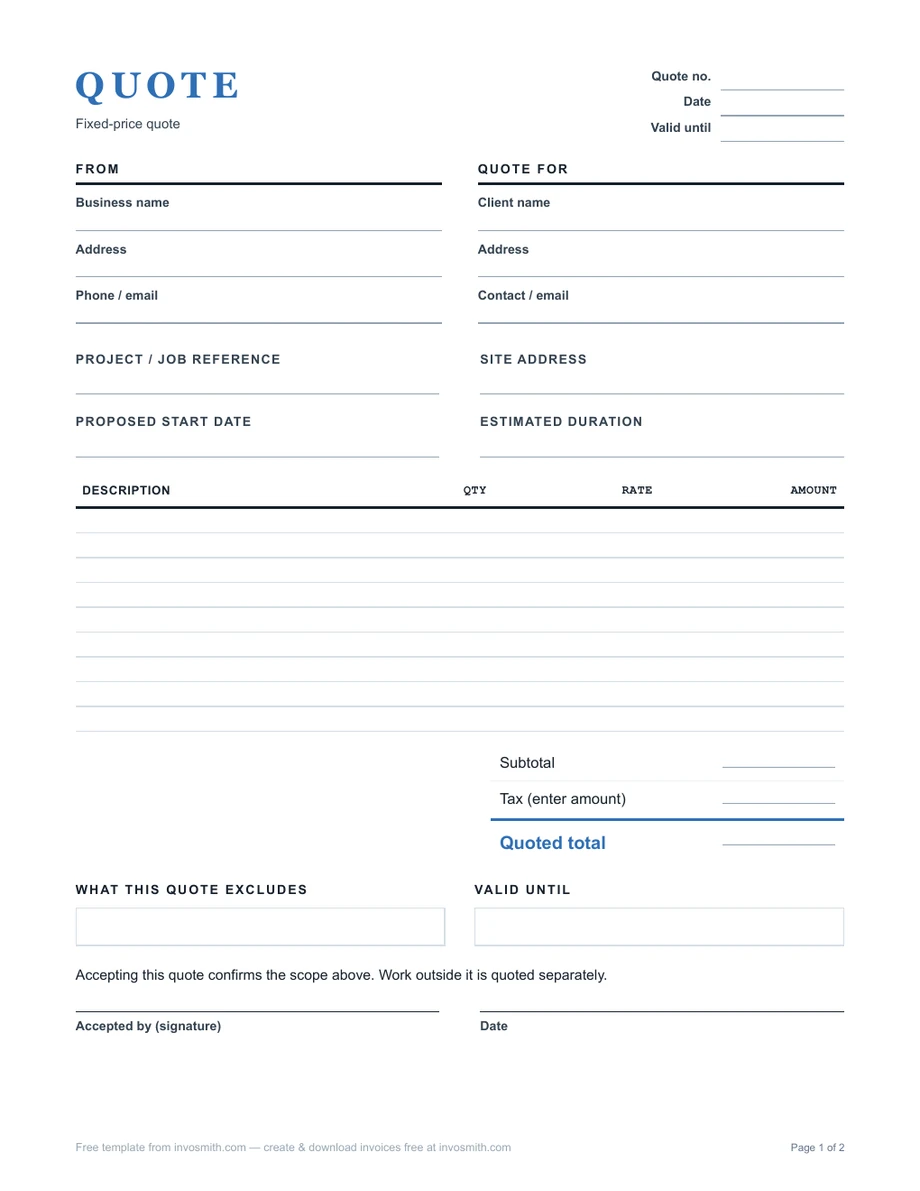
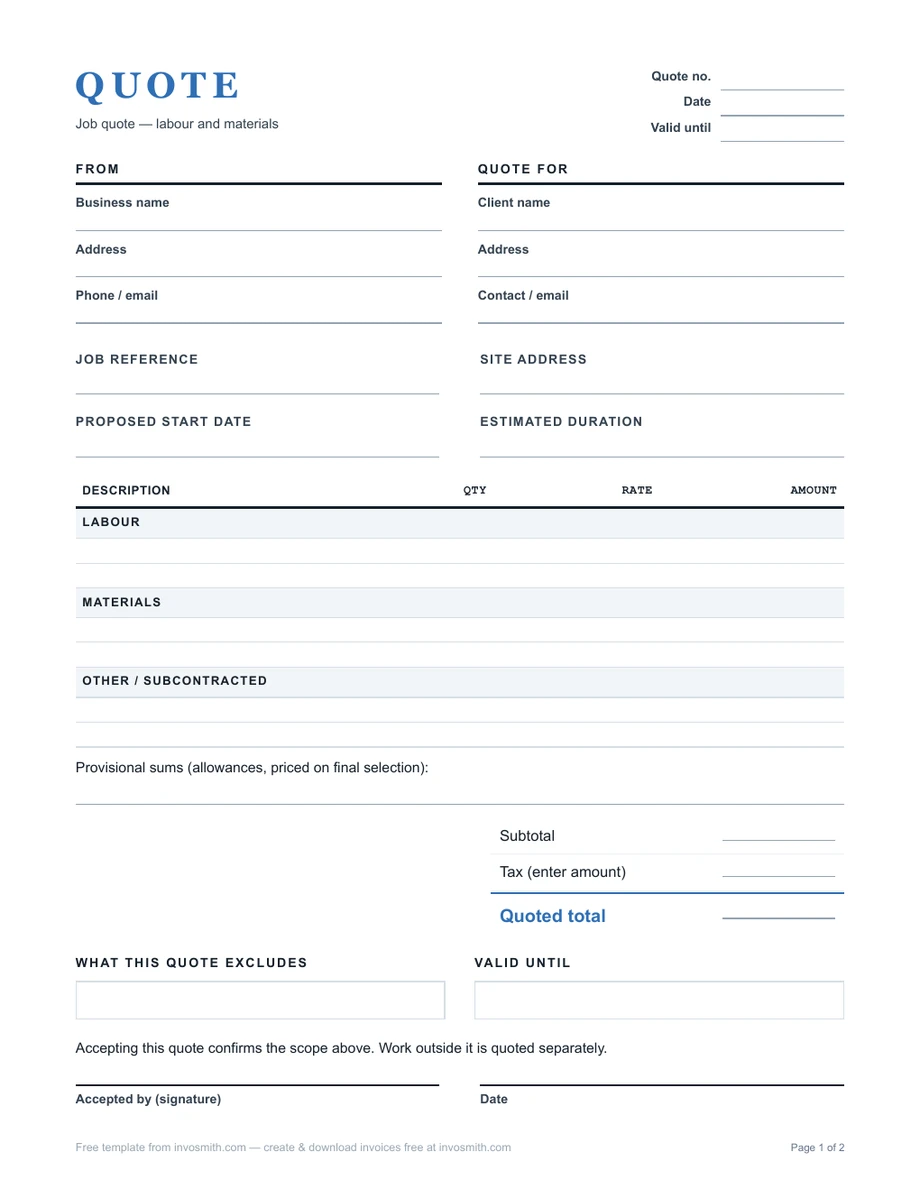
Download the standard quote template as PDF, Word or Excel, or use the job quote version for labour, materials and provisional items.
The files open directly with no account gate or watermark. Each version includes a quote number, dates, customer and job details, line items, tax and total fields, scope notes, payment terms and acceptance.
Use the blank template for the document. Use How to write a quote when you need help defining scope, pricing the work or writing the acceptance and change terms.
Word and Excel versions are listed with each document below.
- No sign-up
- No watermark
- Free
On this page
Choose a quote template format
Quote Template (PDF / Word / Excel)
General service quote with line items, tax, terms, validity and acceptance.
Job Quote Template (PDF / Word)
A job layout with materials, labor and provisional sums.
Australia GST Quote (PDF / Word)
ABN, tax-exclusive line prices, GST breakdown and total including GST, with a separate scope, payment and acceptance page. Enter the applicable treatment yourself.
Australia Non-GST Quote (PDF / Word)
ABN and an explicit GST not charged note, plus scope, payment and acceptance fields. Use only when this matches your tax treatment.
UK VAT Quote (PDF / Word)
VAT registration number, tax-exclusive prices, VAT breakdown and total including VAT, plus scope and terms. Clearly labelled as a quote, not a VAT invoice.
PDF is ready to print. Word is easiest for editing narrative scope and terms. Excel is best when you want line calculations; check every amount before sending.
PDF: download and print, then complete all pages by hand; this is a printable document, not an interactive PDF form. Word: save your own copy, replace the blank fields and include the terms page, then export the completed document to PDF for the customer. Excel: enter quantities, rates and the applicable tax amount on Quote; complete Quote terms, including 0 where no deposit or progress payment is due, and check the calculated balance before exporting both sheets.
Country versions are two-page blank forms with no preset tax rate. Keep the price page and signed terms page together. They use Letter paper; choose Fit when printing on A4 and check the preview before printing.
Adapt the wording and tax fields to the transaction and jurisdiction.
What to look for in a quote template
Use the markup calculator to calculate a selling price from cost before filling the priced scope lines.
| Feature | Why it matters | In this template |
|---|---|---|
| Quote number and expiry date | Both sides refer to one version, and the customer can see how long the price holds. | Quote number, issue date and valid-until date on the first page. |
| Scope lines with a pricing basis | The customer can check each deliverable against its price. | One line per deliverable or phase, with quantity or basis and amount. |
| A separate tax line | The customer knows whether tax is included, excluded or not applicable. | Tax and total fields, plus GST and VAT versions for Australia and the UK. |
| Exclusions | The price has a visible boundary before work starts. | Scope notes with room to name what is excluded. |
| Payment terms and deposit | The customer sees what is due, when and how. | Deposit, progress payment and balance on the terms page. |
| Change approval | Extra work gets a price and a yes before it starts. | A variations line in the terms. |
| Acceptance block | A yes becomes a record you can keep with the job. | Signature, printed name and date under the exclusions, plus an acceptance block on the terms page. |
| Editable formats | You can type it on a computer or fill it in by hand on site. | PDF, Word and Excel, and a job version for labor, materials and provisional sums. |
Look for a quote template with a field for every term the customer agrees to: a quote number and expiry date, priced scope lines, a clear tax line, exclusions, payment and deposit terms, a way to approve changes, and a signature block.
The same fields work for a bid quote. When you price a job against the customer's specification, write one scope line per item in their spec and use the exclusions to name anything the spec leaves open.
Fill the template in this order
If the price may change once work starts, use the estimate maker instead, with a valid-until date and separate labor and material lines.
Start with identity and dates, then scope, price and terms. This order lets the customer answer four questions quickly: who is offering the work, what is included, what it costs and how to accept.
- Quote identity. Add the quote number, issue date and a calendar-date expiry.
- Parties and place. Add your business details, customer details and the service or job-site address when it differs.
- Scope and price. Use one line per deliverable or phase, with quantity or pricing basis and amount.
- Tax and total. State whether tax is included, excluded or not applicable; do not leave the customer to infer it.
- Terms and boundaries. Add payment timing, any deposit, start/finish assumptions, exclusions and the method for approving variations.
- Acceptance. Provide a signature/date area or precise written-acceptance wording and retain the accepted copy.
Worked service quote example
This fictional example shows how the fields connect. It uses USD, assumes no tax in the displayed total and is not a recommended price.
Quote Q-1041 · issued 26 September 2026 · valid until 18 October 2026 · job site: 44 Alder Street. Scope: remove the existing deck surface, supply and install the listed boards, and install 24 linear feet of railing. Exclusions: permits, structural repairs not visible before demolition, staining and landscaping reinstatement.
Illustrative payment terms: $1,100 deposit on acceptance and $4,400 balance within 7 days of completion, by bank transfer. These are chosen example terms, not a recommended or legally permitted deposit for every trade. Acceptance identifies Q-1041 and its attached scope and terms; any additional structural work requires written approval of the price and schedule before proceeding.
| Line | Description | Amount |
|---|---|---|
| 1 | Demolition and disposal of existing deck surface | $450 |
| 2 | Supply and install 200 sq ft composite decking | $3,600 |
| 3 | Supply and install 24 linear ft railing | $1,150 |
| 4 | Finish allowance, final product selected by client | $300 |
| Total before tax | $5,500 |
Quote template examples by trade
The standard quote template fits most service quotes; trades differ in which lines they price and what they leave out. Use the job quote template when one job mixes labor, materials and provisional sums.
| Trade | Lines to price | Name in the exclusions | Start from |
|---|---|---|---|
| Carpentry and joinery | Labor by stage, timber and hardware, finishing | Plaster and paint making-good, repairs found when opening up | Job quote |
| Plumbing | Call-out or first hour, labor, each listed fixture and its parts | Access through tiles or walls, parts beyond the listed fixtures | Job quote |
| Landscaping | Site preparation, plants and materials by quantity, labor by area or by day | Replacing plants after handover, irrigation outside the work area | Job quote |
| Catering | Price per head for the menu, staff hours, equipment hire | Venue hire, service past the agreed finish time | Standard |
| Web design | A fixed fee per phase (design, build, launch) and the number of revision rounds | Copywriting, hosting and third-party plugin fees | Standard |
| Multi-phase projects | One line per phase, each with its deliverable and amount | Work outside the listed phases | Standard |
For a price sheet you reuse, add a rates sheet to the Excel version and copy your standard rates into the quote lines for each job.
When the job is done, bill the same lines from the plumbing invoice template, which keeps call-out, parts and labor on separate lines. Landscapers can carry plants, materials and labor straight onto a landscaping invoice.
Customize the quote template in Word, Excel or Google Docs
Customize the quote template once as a master copy with your logo, business details and standard terms, then make a copy for each customer so the master stays clean.
Word: set it up once, then save it as a template
Add your logo above the From block, fill in your business name, address and phone / email, and add your license number beside them; your ABN or VAT number goes in the registration field on the terms page. Put your standard payment, deposit and variation terms on the terms page. Then choose File › Save As › Word Template (.dotx), and every new quote opens as an untitled copy. Name each finished quote with its number and customer, such as Q-1041 Harlan Voss, and export it to PDF before sending.
Excel: keep your rates on one sheet
The Excel version works out each line from quantity and rate. Add a sheet with your standard labor rates and materials so every quote starts from the same prices, then change only the quantities for each job.
Google Docs: open the Word version
Upload the Word file to Google Drive and open it with Google Docs. You can edit it there, share it with a colleague and download the finished quote as a PDF.
Different clients: one master per kind of job
Keep a master for each kind of work you quote often, such as small repairs and full projects, with the lines and exclusions that job usually needs. Customer details change on every copy; the terms change only when the kind of job does, for example a deposit for new customers and none for repeat ones.
Send the quote and get a clear answer
Send the quote soon after you assess the job, ask the customer to accept in one specific way, and follow up once before the expiry date.
Attach the PDF to an email with the quote number in the subject line, such as Quote Q-1041 – deck replacement, 44 Alder Street. Repeat the total, the expiry date and how to accept in the message, so the customer can reply without opening the file first.
If you have not heard back by the halfway point to the expiry date, send one short reminder that restates the total and the date the price holds until.
Once the customer accepts, the quote's lines become the basis of the bill. Copy them into the invoice maker when the work or a milestone is done, and the invoice matches what was agreed, line for line.
Adapt the template for Australia
Australian Government business guidance says a written quote should include the business name, ABN and contact details; customer details; a clear work description; itemised and total costs including GST if applicable; variations; payment terms and method; start and finish dates; an expiry date; and space for customer acceptance.
For a GST-inclusive quote, label the total including GST and show the GST amount if your adviser or workflow requires it. For a non-GST quote, do not imply GST has been charged; use a clear “GST not charged” or equivalent note appropriate to your registration status. The blank tax field does not decide your tax treatment for you.
Source: Australian Government — Prepare quotes, checked 26 September 2026. Its checklist is Australian business guidance, not a universal tax rule.
Adapt the template for UK VAT
A quote is not itself a VAT invoice. If you use the template to present VAT, make the pricing basis explicit: show the subtotal excluding VAT, the VAT rate and amount used for the quote, and the total including VAT. Confirm the current treatment for your supply before sending it.
When the work is invoiced, HMRC VAT Notice 700 explains the separate information required on a VAT invoice. Do not treat a quote number or acceptance line as a substitute for the later invoice record.
Source: HMRC VAT Notice 700, sections 16.2–16.3, source copy checked 25 September 2026. Those sections address VAT invoices; the quote layout above is practical presentation guidance, not an HMRC-mandated quote form.
Adapt the template for US home improvement work
For US home improvement jobs, the FTC's consumer guidance says a written estimate should include a description of the work to be done, materials, completion date and the price, and this quote template has a field for each.
The same FTC page tells homeowners to ask for a written contract with the contractor's name, address, phone number and license number, estimated start and completion dates, and any promises about the scope and the cost of labor and materials. Add your license number beside your business details and the start and finish dates to the terms page.
If the customer signs at home or anywhere other than your permanent place of business, the FTC's list also includes a written statement of their right to cancel within three business days.
In California, the home improvement contract rules cap the down payment at $1,000 or 10 percent of the contract price, whichever is less. On a $5,500 job like the worked example, that cap is $550.
Sources: FTC — How To Avoid a Home Improvement Scam, last updated 10 December 2025, checked 26 September 2026; California Business and Professions Code §7159, checked 25 September 2026.
Quote, estimate or invoice?
Use a quote when you are proposing a price and terms for a sufficiently defined scope. Use an estimate when important inputs remain uncertain and the figure is approximate; state the assumptions and how revisions will be agreed. Use an invoice after the supply or milestone to request payment.
The title alone does not determine legal effect. Wording, acceptance, transaction and jurisdiction matter. For the document sequence, read Invoice vs quote. For writing and pricing help, follow How to write a quote.
The quote vs estimate guide writes the same bathroom leak repair both ways, with wording you can copy for each document and for a later change.