Free template
Free Simple Receipt Template
A simple receipt is the shortest useful record of a completed payment: receipt number, date, payer, recipient, amount, purpose, method and signature where needed. Use it when one amount and one purpose tell the whole story. Choose a specialized receipt when the transaction needs item lines, rent periods, donation wording, vehicle details or deposit-return records.
Download the simple receipt template
Simple receipt template
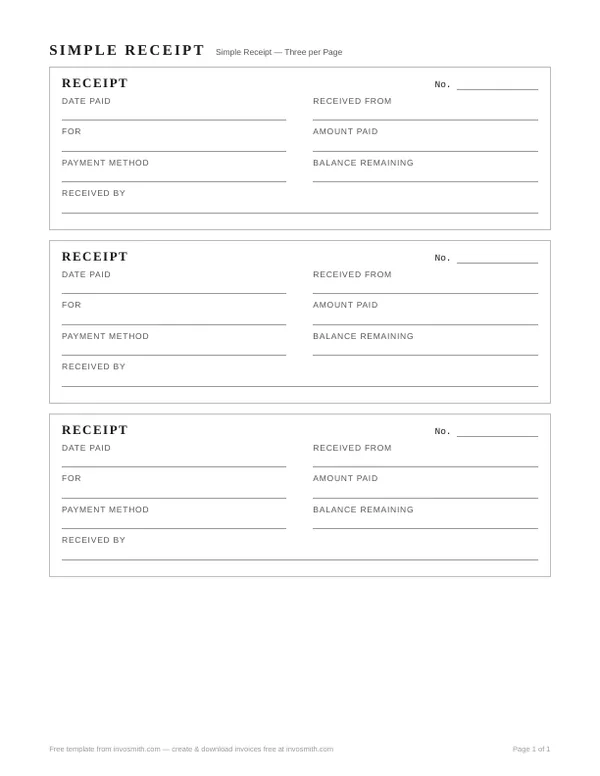
Six essential receipt fields in a compact format.
Every download is free — no email, no sign-up, no watermark.
The PDF and Word files each contain three compact receipts on one US Letter page, ready to complete and cut. The Word file is editable and can also be opened in Google Docs; check the page layout before printing.
What stays on a simple receipt — and what you can safely cut
Six fields carry the whole document. Everything else on a typical receipt template is optional.
Keep these six:
- Receipt number — one per payment, in sequence. It's what makes the record findable later.
- Date paid — the day the money arrived.
- Received from — who paid.
- Received by — who took the payment: a business name, or on cash, the actual person.
- For — what the payment covers, in words that survive being read a year later.
- Amount and payment method — the figure, and how it arrived: cash, check and its number, card, transfer.
Safe to cut — and already cut from this template: the logo block, the itemized line table (one description line does the work), the separate tax breakdown, payment terms, and the notes box. A basic receipt is not a small invoice; it doesn't owe anyone a breakdown.
One line you should keep when it applies: Balance remaining, for partial payments. This blank template prints it with a dash — cross it out or fill it in, but don't leave it ambiguous. If you find yourself wanting the tax line or the item table back, that's the sign you've outgrown simple — the full receipt template for Word has both.
Anything tax-shaped that you do write on a receipt is yours to enter — nothing in these files works anything out for you.
Simple receipt format for printing
The PDF is laid out three-up on US Letter: print, cut along the rules, and keep the stack wherever money changes hands. It's a fixed layout — nothing to edit, nothing to misalign.
The Word file contains three compact receipt blocks on one US Letter page. Fill all three on screen or print the sheet and complete each slip by hand. Keep the number and retained-copy workflow consistent with the receipt book template.
Handwritten and typed receipts can both be useful records. Complete each field clearly and make any correction visible to both parties rather than leaving an unexplained change.
Use the smallest receipt that still fits the transaction
A generic slip is not the owner for every receipt task. The table below routes the payment to the page with the fields it actually needs.
| Payment | Best starting point | Why |
|---|---|---|
| One amount for a completed job | Simple receipt | One purpose line is enough |
| Several goods or services | Sales receipt | Item lines, quantity, price and return-policy field |
| Cash with two copies | Cash receipt | Amount in words, payer and receiver copies |
| Rent | Rent receipt | Property, rental period and balance |
| Donation | Donation receipt | Gift description and benefit-in-return wording |
| Security deposit | Security deposit receipt | Property, deposit purpose and move-out trail |
Paper, electronic and alternative payment records
A receipt may be paper or electronic when the applicable rule accepts it. Keep the version the payer received and preserve enough supporting information to trace the payment. Bank statements, card records, contracts and correspondence can support the same transaction, but they do not always contain the purpose or item detail a receipt supplies.
Record-retention starting points
There is no universal “keep every receipt for X years” rule. Retention depends on the country, record type and whether a return, dispute or audit is still open.
| Source | What it supports | Boundary |
|---|---|---|
| IRS recordkeeping | U.S. federal tax-record retention periods vary by situation | State, contract and non-tax rules may be longer |
| CRA records | Canadian tax and charity record categories have specific periods | Some charity receipt records have special exceptions |
| HMRC records | UK self-employed record categories and general timing | VAT and company records use separate guidance |
| ATO records | Australian business recordkeeping entry point | Confirm the specific record and entity type |
Frequently asked questions
Is a simple receipt still valid proof of payment?
A simple receipt holds up the same way any receipt does: by naming the payer, the payee, the amount, the date and what the payment was for — all six of which are on this slip. Validity comes from the facts being recorded, not from how long the form is. This isn't legal advice.
What about cash payments — does this receipt work for those?
Cash is exactly where a written receipt matters most, because there's no bank record behind it. Write "Cash" on the payment-method line, and have the person who physically took the money put their name on Received by. Give the payer the slip; keep a copy or the stub for yourself.
Where does tax go on a simple receipt?
Tax has no separate line here — the amount is the amount received, full stop, which is how most small cash-in-hand receipts work. If you need tax shown on its own line, use the full receipt template for Word instead; what goes in that line is yours to enter either way.