Four ways to bill client work

Free Freelance Invoice Template

A freelance invoice template turns finished client work into a payment request that is easy to check and approve. Each sample in this freelance invoice template follows an existing billing method: hourly, per-piece, project or retainer. Start with the way you agreed to bill: by the hour, by the word or piece, by project and deposit, or by monthly retainer. Every example below is filled with fictional details, so you can see where the work, rate, prior payment and balance belong before editing your own copy.

Free files. No sign-up and no watermark.
Filled exampleProject + deposit
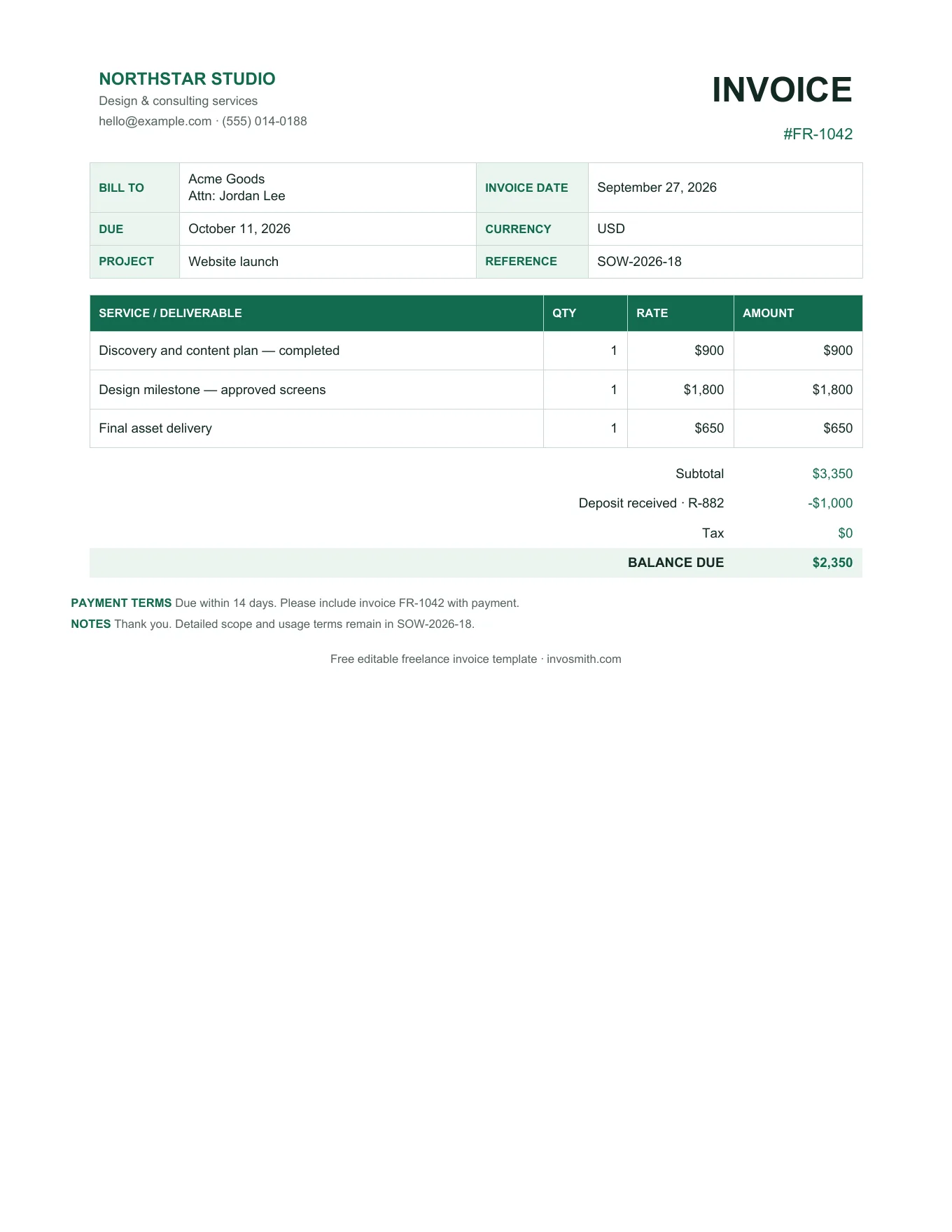
Filled freelance project invoice example with deposit paid, extra revision and balance due
The full charge, deposit already paid and balance due stay visible together.
Choose by billing method

Freelance invoice samples by billing method

These are four filled freelance invoice examples, not blank document thumbnails. Compare the unit, line items and prior payments, then download the version closest to your job.

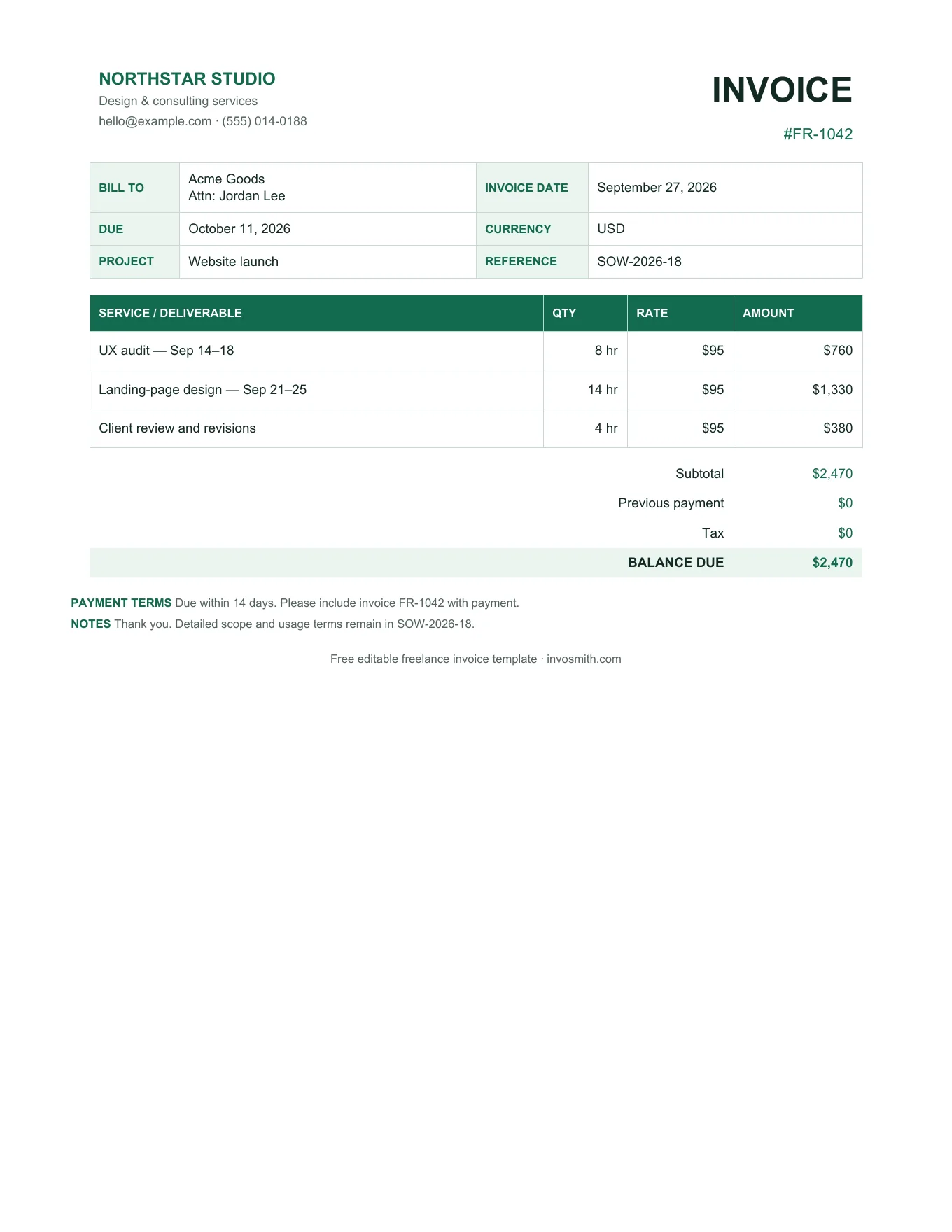
Developer · virtual assistant · consultantFilled hourly freelance invoice example with hours, rates, expenses and amount due

Hourly

12 hours of interface development at $95/hour, plus one approved software expense.

Split unlike tasks into separate lines, state the service period and keep reimbursable expenses apart from billable time. A client should be able to multiply the hours by the rate and reach the line amount immediately.

Download this style
Freelance writer · editor · translatorFilled freelance writer invoice example with word count, unit rate and rush fee

Per word / per piece

2,400 translated words at $0.18/word, plus a clearly labelled rush fee.

Use the delivered unit the client approved: words, articles, pages, captions or another piece. Put revisions outside the agreed scope on a separate line instead of hiding them inside the base rate.

Download this style
Designer · photographer · filmmakerFilled freelance project invoice example with deposit paid, extra revision and balance due

Project + deposit

Brand identity delivery, one approved extra revision and a $900 deposit already received.

Name the deliverable or milestone, show approved extra work separately and subtract the deposit after the total. If usage rights affect the price, identify the licensed deliverable without reproducing the whole agreement on the invoice.

Download this style
Social media manager · adviser · ongoing consultantFilled monthly retainer freelance invoice example with service period and approved overage

Monthly retainer

September content-management retainer with one approved campaign overage.

State the exact service period and fixed retainer. Put approved overage on its own line so the normal monthly fee stays recognizable. The invoice describes this billing period; the service agreement holds the broader scope.

Download this style
Field-by-field guide

What to put in each part of a freelance invoice.

The document should connect the client, the agreed work and the amount now due. Keep detail that explains the charge; leave the full project history in the proposal, contract or work log.

01

Invoice number, dates and client reference

Give every invoice its own number and keep the sequence understandable to you. Put the invoice date and payment due date beside it. If the client uses a purchase order, campaign code or project reference, place that reference where accounts payable can see it without opening another file.

02

Your details and the billing contact

Use the business or trading name the client knows, plus a reply email and mailing address. Address the invoice to the legal client name and the person or team responsible for approving payment. A clear billing contact is more useful than sending the document to a general inbox with no owner.

03

Description, quantity, unit and rate

Name the delivered outcome in language the client will recognize. Then use the unit that matches the agreement: hours, words, articles, days, sessions or one project milestone. The downloadable templates include a Unit column and calculate each line from quantity × rate. The free online editor uses item descriptions, quantity and rate rather than a separate Unit field.

04

Deposit paid and balance due

Show the full charge first, then record a deposit or earlier payment as its own deduction. Include the date or earlier invoice reference so the client can reconcile it. The downloadable project file calculates the remaining balance. The online editor does not currently provide separate paid and balance fields, so add that detail to the notes when using the editor.

05

Tax identifier placeholder

Keep one labelled place for the identifier that belongs on your document, such as ABN, UTR, VAT number or GSTIN. Choose the label that applies to your invoice rather than printing every identifier at once. The tax amount remains an editable input in the files so the template does not decide a tax treatment for you.

06

Payment instructions

State the payment method, account or payment-link details, accepted currency and the reference the client should include. For bank transfers, this is also where an IBAN or SWIFT/BIC can sit. Keep sensitive login information off the invoice. If you use Invosmith after signing in, you can save default payment instructions for later invoices.

International clients

Give an overseas client one unambiguous way to pay.

An international invoice needs the same clear work and totals as a domestic invoice, plus an explicit currency and payment route. Put the operational details on the document so accounts payable does not need to reconstruct them from email.

  1. 01

    Name the invoice currency

    Put the currency beside the total and use the same currency for every line. A symbol alone can be ambiguous, so write USD, AUD, GBP, EUR or the agreed code as well.

  2. 02

    Give one complete payment route

    Use the Payment instructions area for the account name and bank details, IBAN and SWIFT/BIC, a PayPal address, a Wise link or the other method agreed with the client.

  3. 03

    Make fees and timing visible

    State who carries transfer fees and give a calendar due date. If the payment reference must match the invoice number, say so beside the instructions.

Payment instructions example
CurrencyUSD
MethodWise transfer
ReferenceINV-1048
Due30 Sep 2026

“Client covers intermediary bank fees” belongs in the agreed payment terms when that is the arrangement.

After you send it

Keep the next payment step attached to the invoice.

A download solves the document. The workspace helps when that document becomes a deposit, an overdue balance, a repeating retainer, a receipt or a reporting record. Availability is labelled before you choose a feature.

Free

See what is still unpaid

Keep the amount and due date visible in the invoice list so an overdue client does not disappear into a sent-email folder.

Sign in

Turn an approved quote into an invoice

Reuse approved client and line-item details when the project moves from quote to deposit, milestone or final billing.

Pro

Repeat a monthly retainer

Use recurring invoices for a stable monthly billing schedule instead of rebuilding the same retainer invoice each period.

Sign in

Issue a receipt after payment

Create a receipt from the recorded payment so the client has a separate proof-of-payment document.

Sign in

Export records for reporting

Export invoice data as CSV when you need a portable list of billed work and payment status.

Before sending

Run a five-point freelance invoice check.

Review the document as the client will receive it. This short pass catches mismatched terms, unclear totals and incomplete payment details while the invoice is still easy to correct.

01

Match the invoice to the agreement

Compare the client name, billing method, service period, deliverable and rate with the accepted proposal or contract. If the scope changed, show the approved extra work on a separate line so the original charge remains easy to recognize.

02

Recalculate the path to the balance

Check each quantity × rate line, then follow the subtotal through tax, discounts, deposits and earlier payments. The final balance should be reproducible from the numbers printed above it without relying on a separate message.

03

Use a specific due date

Translate payment terms into a calendar date and show it near the amount due. A date gives the client and accounts-payable team one shared deadline, while the terms can remain in the notes for context.

04

Test the payment instructions

Confirm the account name, payment link, currency and invoice reference before sending. Open links in a private browser window when practical, and remove placeholders or instructions that belong only to the example.

05

Send a stable final copy

Export or save the finished invoice as a PDF for delivery, then keep the editable Word or Excel source for your records. Use the invoice number in the filename and email subject so the document can be found later.

Free online option

Fill the freelance invoice in online

Use the free invoice maker for client details, line items, currency, tax and notes, then export the finished invoice as a PDF. The downloadable files add specialist fields such as Unit, Paid and Balance due.

Open the invoice maker
Practical answers

Freelance invoice template questions.

01Is this freelance invoice template free?

Yes. The PDF, Word and Excel templates can be downloaded without payment. The online invoice maker can also create and export an invoice. Features that manage ongoing client records or automate later billing may require an account or a paid plan and are labelled on the page.

02Do I need to register before downloading a template?

No. The document downloads are available without registration. You can also fill and export a basic invoice in the online maker. Sign-in is used when you want to save business details, keep invoices in a workspace or use account-based follow-up features.

03Can I change the currency?

Yes. Replace the currency symbol and label in Word, or change the number format in Excel. In the online invoice maker, select the currency before exporting. Use one clearly stated currency throughout the invoice so the client knows what amount to send.

04How do I show a deposit on a freelance invoice?

List the complete project or milestone charge, calculate the subtotal and tax, then subtract the deposit as a prior payment. The final line should be the amount still due. Add the deposit date or receipt reference so the deduction can be matched to the earlier payment.

05How can an overseas client pay a freelance invoice?

Agree on a currency and payment method, then put the exact instructions in the Payment instructions area. Depending on the method, that may include IBAN and SWIFT/BIC details, a PayPal address, a Wise payment link or another agreed link. State who carries transfer fees in the payment terms.

06Is this the same as an independent contractor invoice?

The accounting fields can be similar, but this page is organized around freelance billing methods such as per-word work, creative-project deposits and monthly retainers. Use the independent contractor invoice template when the client treats the work as a contractor or vendor workflow.

Related templates

Use the page that matches the client workflow.

04

Invoice maker

Build an invoice online and export a finished PDF.